
JavaScript Learning Roadmap (Beginner to Mastery Guide)

Senior WebCoder
The JavaScript Learning Roadmap is designed for beginners who want to move step by step towards becoming confident with JavaScript.
Think of it this way:
- HTML → Skeleton (structure)
- CSS → Clothes (style)
- JavaScript → Brain (makes everything alive)
This roadmap takes you from zero to mastery, with easy explanations, real-life examples, and practice exercises.
🟢 Step 1: Basics of JavaScript
Concept: JavaScript can store information and perform actions.
- Variables → boxes where you keep data
- Data Types → the kind of data inside (numbers, text, true/false)
- Operators → actions you perform on data (+, -, *)
Example: Shopping cart system
let productName = "Laptop";   // string
let price = 50000;            // number
let inStock = true;           // boolean
console.log("Product:", productName);
console.log("Price:", price);
console.log("Available:", inStock);
👉 Practice: Create variables for a bus ticket system (passenger name, seat number, isPaid).
🟢 Step 2: Control Flow
Concept: Control flow decides what happens next.
- If something is true → do this
- Else → do something else
- Repeat actions using loops
Example: Supermarket discount system
let amount = 1200;
if (amount > 1000) {
  console.log("You get a 10% discount!");
} else {
  console.log("No discount available.");
}
👉 Practice: Print numbers 1–16 using a for loop.
🟢 Step 3: Functions
Concept: Functions are like machines — input → process → output.
Example: ATM → You insert a card (input), it checks the details (process), then gives cash (output).
function isEven(num) {
  return num % 2 === 0;
}
console.log(isEven(10)); // true
console.log(isEven(7));  // false
👉 Practice: Write a function to calculate the square of a number.
🟢 Step 4: Arrays and Objects
Concept:
- An array = a list of items (like a row of seats in a bus).
- Object = item with details (like a passenger with name, seat, ticket number).
Example: Shopping Cart Total.
let cart = [
  { product: "Mobile", price: 15000 },
  { product: "Headphones", price: 2000 },
  { product: "Charger", price: 800 }
];
let total = cart.reduce((sum, item) => sum + item.price, 0);
console.log("Total Cart Value:", total);
👉 Practice: Create an array of products with prices and calculate the total
🟢 Step 5: DOM (Document Object Model)
Concept: The DOM connects HTML with JavaScript. You can select elements, change them, and react to user actions.
Example: To-Do App
<input id="taskInput" placeholder="Enter task">
<button id="addBtn">Add Task</button>
<ul id="taskList"></ul>
let btn = document.getElementById("addBtn");
btn.addEventListener("click", function () {
let input = document.getElementById("taskInput").value;
let li = document.createElement("li");
li.textContent = input;
document.getElementById("taskList").appendChild(li);
});👉 Practice: Make a button that changes the background color when clicked.
🟢 Step 6: Mastery JavaScript
Concepts:
- ES6 features (shortcuts)
- Promises &
async/await(handle waiting) - Fetch API (get data from the internet)
Example: Fetch GitHub profile
async function getUser(username) {
  let response = await fetch(`https://api.github.com/users/${username}`);
  let data = await response.json();
  console.log(data);
}

getUser("torvalds");
👉 Practice: Fetch and display weather data for your city.
🟢 Step 7: Advanced Concepts
Concepts:
- Closures → functions inside functions
- Classes → create blueprints for objects
- Event loop → how JavaScript handles tasks in the background
Example: Bank account system using a class
class BankAccount {
  constructor(name, balance) {
    this.name = name;
    this.balance = balance;
  }
  deposit(amount) {
    this.balance += amount;
  }
  withdraw(amount) {
    this.balance -= amount;
  }
}

let account = new BankAccount("Arun", 5000);
account.deposit(2000);
console.log(account.balance); // 7000
🟢 Step 8: Build Projects 🚀
Learning becomes real when you build projects:
- Digital Clock
- Calculator
- Weather App (API)
- Expense Tracker
- Tic-Tac-Toe Game
🔹 Conclusion
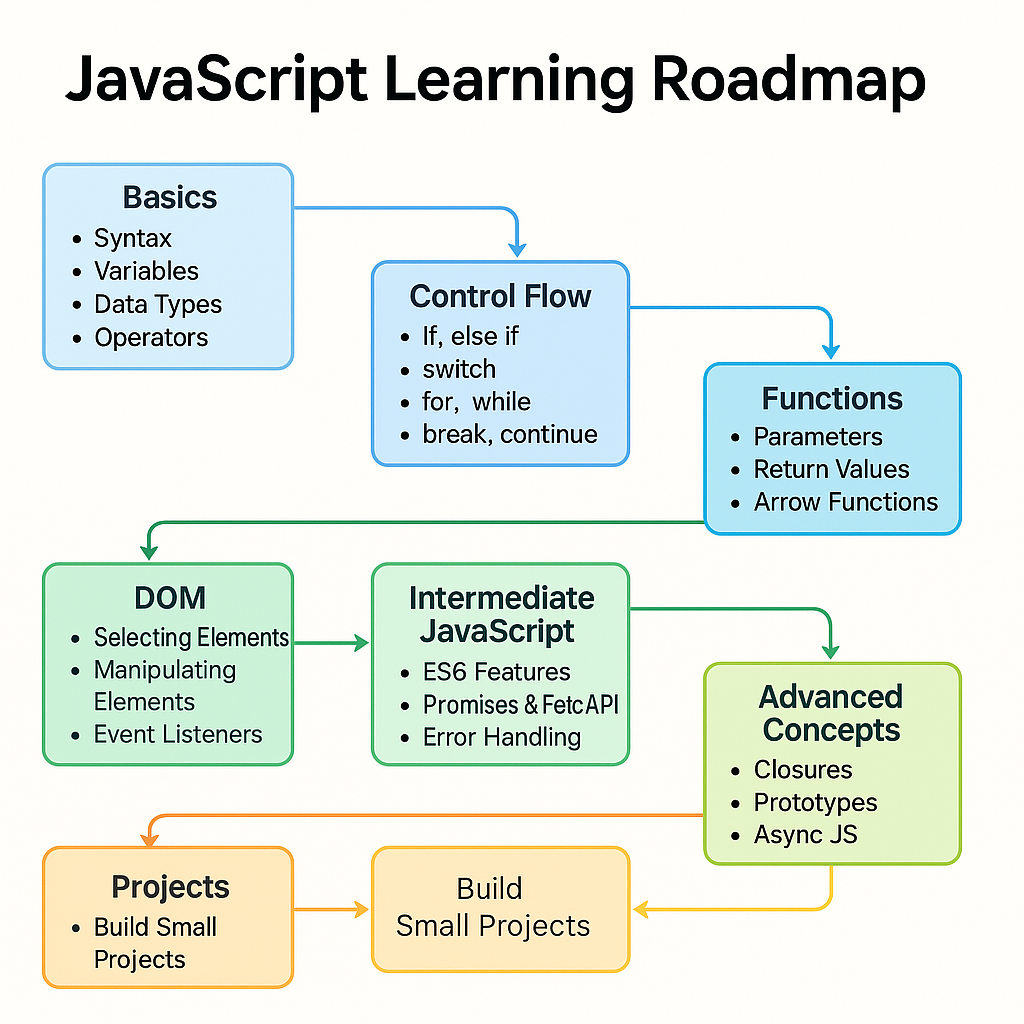
Learning JavaScript is like climbing stairs: Basics → Functions → DOM → Intermediate → Advanced → Projects. Take one step at a time, practice consistently, and you’ll gain real skills.
👉 Next Steps for Learners
If your goal is to become a JavaScript developer, start here:
-
📘 Learn JavaScript – Step-by-Step Guide
A structured, beginner-friendly guide that takes you deeper into JavaScript with practical examples.
-
🎯 Personalized JavaScript Developer Coaching
Get 1:1 guidance, code reviews, and career tips tailored to your learning style and goals.
Take the next step and turn your practice into real developer skills! 🚀
Abinesh S
Senior WebCoder
Senior WebCoder at FUEiNT, specializing in advanced frontend architecture, Next.js, and performance optimization. Passionate about determining the best tools for the job.