
AWS S3: Master the World’s Leading Cloud Object Storage

Senior WebCoder

Introduction
In today’s data-driven world, storage is about more than just persistence; it’s about scalability, durability, and high availability. Amazon Simple Storage Service (AWS S3) is an object storage service that offers industry-leading scalability, data availability, security, and performance.
From small startups to Fortune 500 companies, AWS S3 is the backbone for storing and retrieving any amount of data, at any time, from anywhere on the web.
Amazon S3 Usage: The Fundamentals
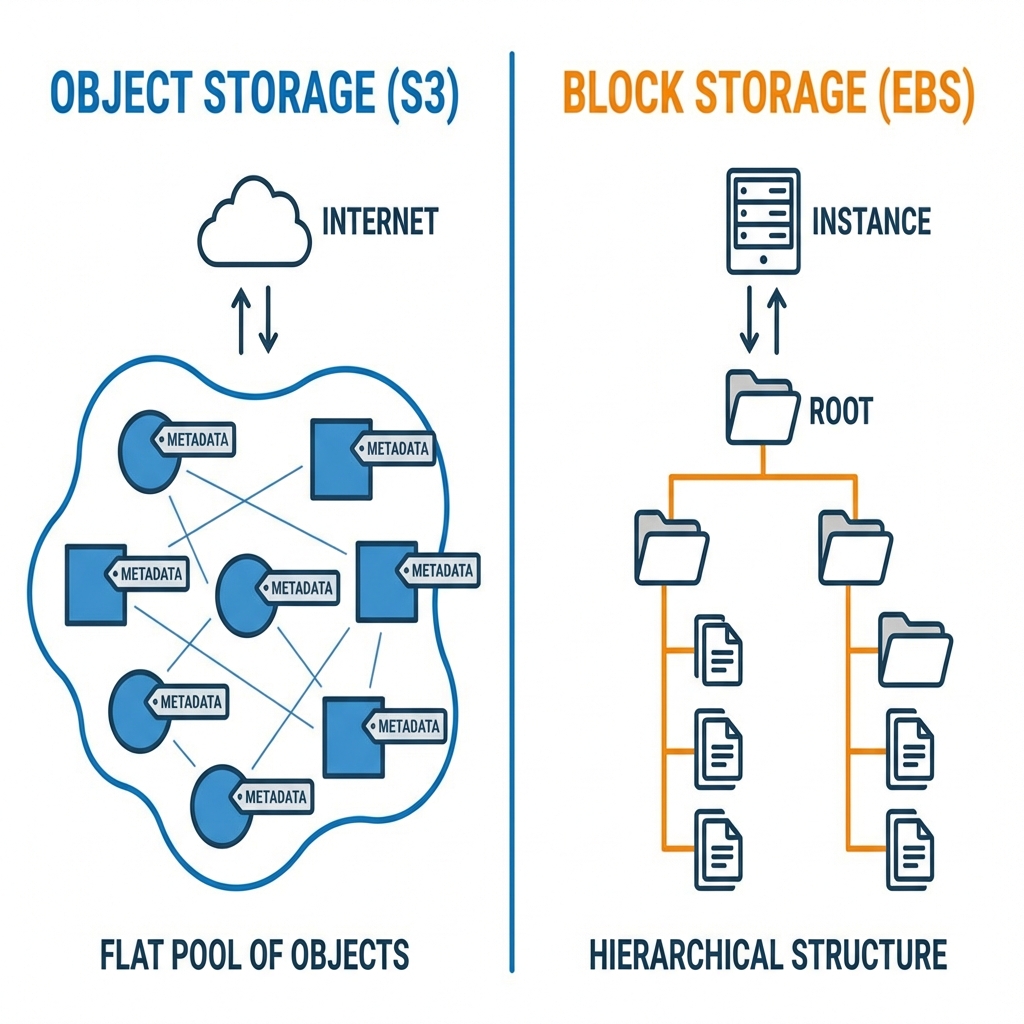
To use S3 effectively, you need to understand three core concepts: Buckets, Objects, and Keys.
- Buckets: A container for objects stored in Amazon S3. Every object is contained in a bucket.
- Objects: The fundamental entities stored in Amazon S3. An object consists of object data and metadata.
- Keys: A unique identifier for an object within a bucket. Every object in a bucket has exactly one key.
How to Use an Amazon S3 Bucket
Using an S3 bucket follows a simple lifecycle:
- Create a Bucket: Choose a globally unique name and a specific AWS Region.
- Upload Data: Upload files (objects) up to 5 TB in size.
- Set Permissions: Control who can see or modify your data.
- Retrieve Data: Access objects via HTTP/HTTPS or the AWS CLI/SDK.
Key Features & Capabilities
AWS S3 isn't just a "folder in the cloud." It's a high-tech ecosystem with powerful technical capabilities:
- 11 Nines of Durability (99.999999999%): S3 is designed to provide unprecedented durability by automatically replicating data across multiple Availability Zones.
- Unlimited Scalability: S3 scales to handle virtually any number of objects and any volume of data.
- High Performance: Features like Transfer Acceleration and data retrieval speeds that grow as your storage grows.
- Security by Default: All new buckets have Block Public Access enabled by default.
S3 Storage Classes: Deep Dive
Optimizing your storage cost means choosing the right storage class based on access patterns.
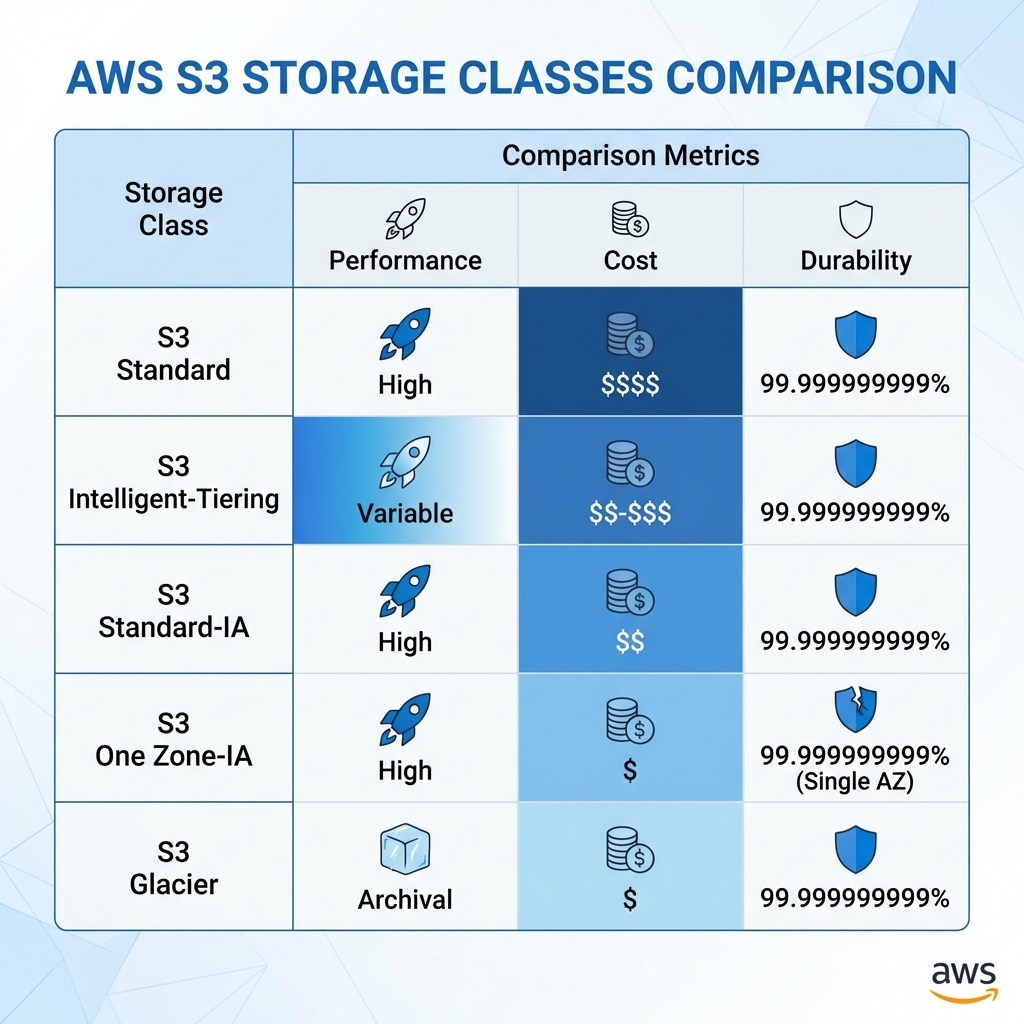
| Storage Class | Description | Ideal For |
|---|---|---|
| S3 Standard | High durability, availability, and performance for active data. | Websites, mobile apps, gaming. |
| S3 Intelligent-Tiering | Automatically moves data to the most cost-effective tier. | Data with unpredictable access. |
| S3 Standard-IA | For data that is accessed less frequently but requires rapid access. | Long-term backups, disaster recovery. |
| S3 One Zone-IA | Similar to Standard-IA but stores data in a single AZ. | Non-critical, reproducible data. |
| S3 Glacier Instant Retrieval | Archive storage with millisecond retrieval. | Medical records, news media archives. |
| S3 Glacier Deep Archive | Lowest-cost storage (hours retrieval time). | Compliance data, long-term logs. |
AWS S3 Bucket Permissions & Security
Security is the #1 priority when using S3. AWS provides multiple layers of defense:
1. Block Public Access
This is a control that allows you to block all public access to your buckets and objects. Keep this ON unless you are hosting a public website.
2. IAM Policies
Identity and Access Management (IAM) policies are attached to a User or Role. They define who can access a bucket.
3. Bucket Policies
Bucket policies are attached directly to the bucket. They define what can happen within the bucket. For example, you can limit access to a specific IP address or a specific website domain (Referer check).
4. Encryption
- SSE-S3: AWS manages the encryption keys.
- SSE-KMS: You manage the keys via AWS Key Management Service (KMS).
Advanced Features
Once you master the basics, you can leverage S3's advanced features for automation and optimization:
- S3 Versioning: Keep multiple versions of an object in the same bucket. This protects you from accidental deletions or overwrites.
- S3 Lifecycle Management: Automatically transition objects to cheaper storage classes (e.g., Standard to Glacier) after 30 days.
- S3 Replication: Automatically replicate objects across different AWS Regions (CRR) for disaster recovery or closer data access.
- S3 Transfer Acceleration: Uses CloudFront’s globally distributed Edge Locations to accelerate uploads to S3 buckets over long distances.
Deep Dive: Serving S3 Images in a Website
For developers, serving images efficiently is key.
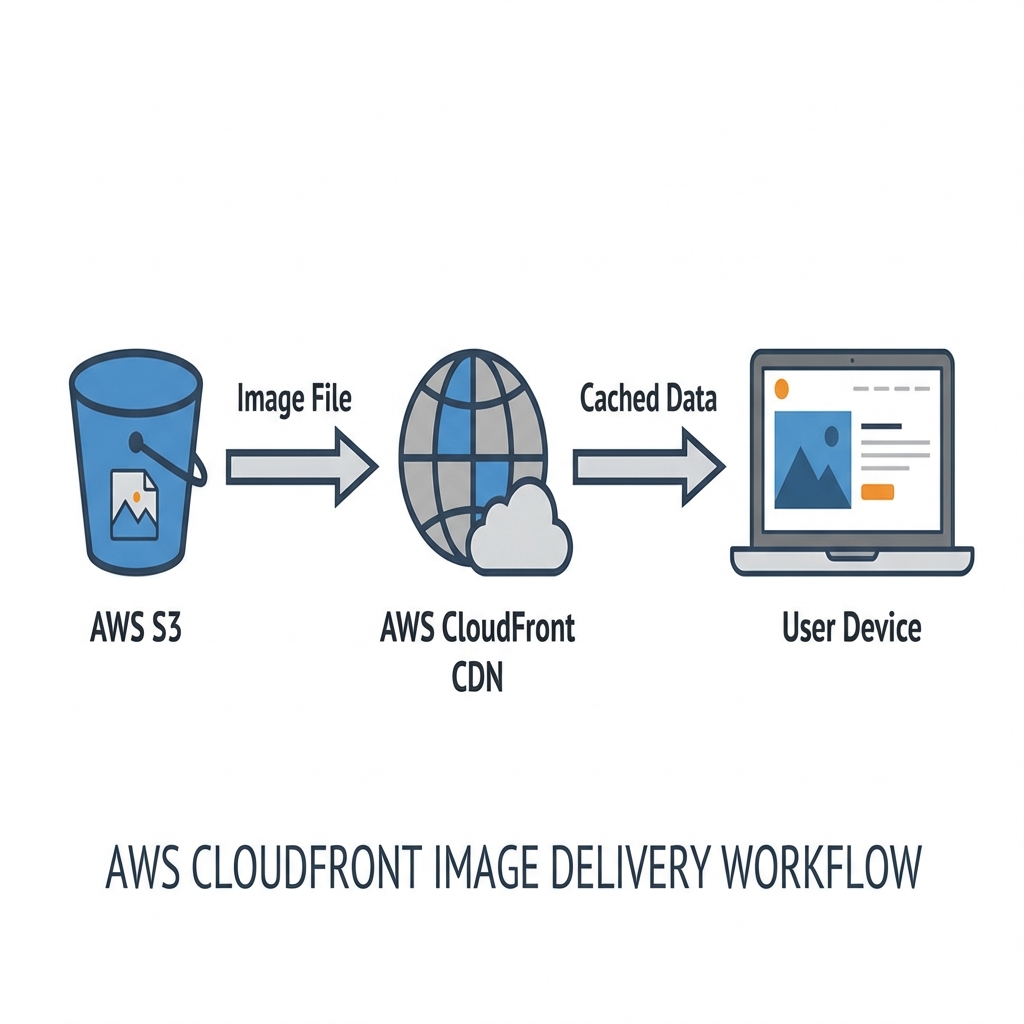
- Method 1: AWS CloudFront (Recommended): Serve images through a CDN for better performance, custom domains, and OAC security.
- Method 2: Pre-signed URLs: Generate temporary links for private content (e.g., a user's private gallery).
- Method 3: Public Website Hosting: Configure S3 to behave like a static web server.
Real-World Industry Use Cases
S3 is utilized across various industries for diverse needs:
- Static Website Hosting: Host high-performance React or Vue apps without a server.
- Backup and Restore: Cost-effective and durable storage for database backups.
- Data Lakes: The foundation for Big Data analytics and Machine Learning.
- Media Hosting: Serving videos and images for streaming platforms and e-commerce.
- Software Distribution: Storing and distributing software binaries and installers.
Conclusion
AWS S3 is much more than a simple storage service; it is a complex, robust, and highly secure platform that can adapt to any technical requirement. By understanding storage classes, mastering permissions, and leveraging advanced features like Lifecycle policies, you can build a storage architecture that is both powerful and cost-effective.
Ready to start your S3 journey? The cloud is the limit.
Gokila Manickam
Senior WebCoder
Gokila Manickam is a Senior WebCoder at FUEiNT, contributing expert insights on technology, development, and digital strategy.